How a Hospital Management System Improves Daily Hospital Operations
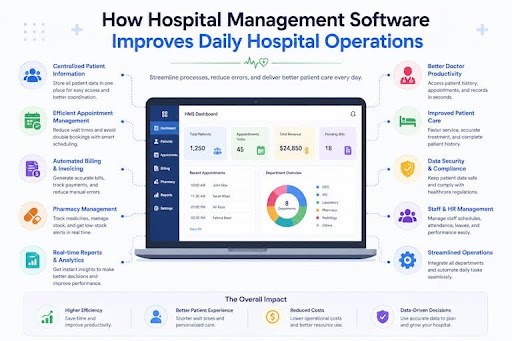
Running a hospital or healthcare clinic involves managing hundreds of daily patient visits, clinical appointments, laboratory tests, pharmacy prescriptions, and financial transactions. Coordinating these operations manually or using disconnected software leads to long patient queues, misplaced records, administrative fatigue, and revenue loss.
A modern Hospital Management System (HMS) unifies every department into a central digital platform. By streamlining daily tasks, automating clinical workflows, and facilitating real-time communication across departments, an HMS enables healthcare facilities to deliver faster, safer, and more efficient patient care.
Here is a complete guide on how a Hospital Management System transforms daily hospital operations, the core portals it provides, the operational problems it solves, and why HMS PLUS is the ideal system for your healthcare facility.
What Is a Hospital Management System?
A Hospital Management System (HMS) is an integrated healthcare software platform designed to manage and automate daily clinical, administrative, and financial workflows. It connects all major hospital departments—including front desk reception, outpatient and inpatient care, laboratories, pharmacies, accounting, and human resources—into a single unified database.
By replacing physical paperwork and siloed spreadsheets with centralized digital records, an HMS improves operational efficiency, protects patient health data, and ensures seamless coordination across your medical and administrative teams.
What Portals Does a Hospital Management System Offer?
A comprehensive HMS uses specialized, role-based portals tailored to the specific daily workflows of different hospital staff members.
Receptionist Portal
The receptionist portal serves as the primary entry point for patient care. It simplifies outpatient department (OPD) registration, manages digital queue tokens, schedules appointments, and coordinates inpatient department (IPD) bed admissions. Front desk staff can check doctor availability in real time and complete patient check-ins without long waiting lines.
Doctor Portal
The doctor portal provides medical staff with digital tools to conduct efficient consultations. Physicians can access Electronic Health Records (EHR), review patient medical histories, check diagnostic lab reports, and issue digital prescriptions (e-prescriptions) in seconds, reducing errors caused by handwritten notes.
Accounts Portal
The accounts portal acts as the financial engine of the hospital. It automatically collects billable charges from OPD consultations, IPD room stays, diagnostic lab tests, surgeries, and pharmacy orders into a single itemized bill. It handles insurance claims, processes co-payments, and generates daily collection summaries.
Pharmacy Portal
The pharmacy portal automates prescription fulfillment and medication tracking. It receives digital prescriptions directly from doctor consultation screens, processes orders immediately, tracks batch expiration dates using First-Expiry-First-Out (FEFO) logic, and generates clear billing receipts for patients.
HR Portal
The human resources (HR) portal manages hospital personnel records across doctors, nurses, administrative teams, and support staff. It automates duty rosters, tracks staff attendance, processes leave requests, manages payroll calculations, and maintains active certifications and licenses.
Laboratory Portal
The laboratory portal manages the entire diagnostic testing lifecycle. Lab technicians can scan barcoded test samples, import automated results directly from connected diagnostic machinery, and publish verified digital lab reports straight to the patient’s digital health profile.
Admin Portal
The admin portal gives hospital directors complete control over the platform. Administrators can manage role-based access permissions, review executive analytics dashboards, monitor department profitability, audit system logs, and adjust global configuration settings.
Common Problems a Hospital Management System Solves
Disorganized Patient Records
Paper files and fragmented computer folders make retrieving past medical histories slow and prone to errors. An HMS centralizes all patient records under a single Unique Health Identification (UHID) number, allowing authorized staff to instantly view complete treatment histories, allergies, and diagnostic reports.
Slow Reception and Appointment Management
Manual scheduling causes double bookings, long queue times, and frustrated patients. An HMS automates appointment scheduling, sends automated SMS or email reminders, manages digital queue tokens, and speeds up front-desk registration.
Difficulty Tracking Income and Expenses
Manual billing across multiple departments often results in unbilled services and revenue leakage. An HMS automatically aggregates charges from consultations, labs, and pharmacies into one unified billing invoice, eliminating calculation mistakes and unrecorded services.
Poor Coordination Between Departments
When departments operate independently, staff members waste time calling or walking between rooms to transfer files, prescriptions, and test results. An HMS shares data in real time, so lab results, prescriptions, and billing updates move instantly across departments.
Challenges in Managing Doctors and Staff
Organizing shift schedules, tracking attendance, and calculating payroll for large medical teams can create major administrative burdens. An HMS automates staff scheduling, monitors attendance, and streamlines payroll processing to keep operations running smoothly.
Pharmacy and Inventory Management Problems
Stockouts of essential medicines or stock waste due to expired drugs hurt both patient care and profit margins. An HMS monitors stock levels in real time, sends low-stock alerts, tracks expiration dates automatically, and triggers reorders when inventory reaches minimum thresholds.
Repetitive Manual Work and Reporting
Compiling manual daily collection summaries, bed occupancy reports, and operational summaries takes hours of administrative effort. An HMS generates detailed real-time reports with a single click, saving administrative time and providing accurate operational data.
How to Choose the Right Hospital Management System
Selecting the ideal hospital management software requires evaluating solutions against key operational criteria:
Identify Your Hospital’s Requirements
Start by auditing your facility's current workflows and identifying bottlenecks. Determine whether you need a basic system for outpatient care or a full multi-department suite including IPD, LIS, Pharmacy, and Accounts modules.
Check the Available Modules and Portals
Ensure the system includes dedicated role-based portals for all your key teams—receptionists, doctors, nurses, pharmacists, lab technicians, and accountants—so everyone works efficiently within the same system.
Consider Ease of Use
Clinical staff work under high-pressure conditions and cannot spend extra time navigating complicated menus. The software interface should be clean, responsive, and intuitive, requiring minimal clicks and training to complete routine tasks.
Review Reporting and Analytics Features
Choose an HMS that provides real-time reporting dashboards. Look for built-in analytics that track key performance metrics such as bed occupancy rates, daily cash collections, pharmacy turnover, and individual department revenue.
Check Security and Data Management
Healthcare software handles sensitive personal data. Verify that the platform protects patient confidentiality using end-to-end data encryption, automated system backups, strict role-based access permissions, and compliance with healthcare privacy regulations.
Consider Scalability and Support
Select cloud-native or modern web software capable of handling increasing patient numbers, added beds, or new branch locations without performance slowdowns. Ensure the software vendor offers 24/7 technical support and regular system updates.
Compare Pricing and Overall Value
Review all subscription fees, implementation costs, training charges, and ongoing maintenance plans upfront. Choose a solution that offers clear pricing and measurable long-term value through time savings and reduced operational costs.
Why Choose HMS PLUS for Your Hospital?
HMS PLUS is a modern, enterprise-ready hospital management system engineered to streamline daily operations, eliminate billing errors, and elevate patient care across clinics, diagnostic centers, and multi-specialty hospitals.
Here is why healthcare organizations trust HMS PLUS:
- All-in-One Departmental Integration: HMS PLUS seamlessly links reception, consultation rooms, pharmacies, laboratories, accounting, HR, and inventory into one cohesive platform, eliminating double data entry.
- Intuitive Role-Based Portals: Custom-designed portals for every team member reduce training time, eliminate interface clutter, and speed up daily clinical and administrative tasks.
- Enterprise-Grade Data Security: Built with robust security protocols, HMS PLUS encrypts health records, maintains audit trails, and enforces strict permission controls to protect patient data privacy.
- Real-Time Operations & Revenue Dashboards: Hospital executives gain instant visibility into patient flow, daily cash collections, bed occupancy, and department profitability from any device.
- Scalable Cloud Architecture: HMS PLUS scales effortlessly alongside your healthcare practice, whether you manage a single specialty clinic or operate a multi-branch hospital network.
Frequently Asked Questions
Does My Hospital Need a Hospital Management System?
Yes. Any healthcare facility—from small outpatient clinics to large multi-specialty hospitals—benefits significantly from an HMS. It eliminates paper clutter, reduces waiting times, prevents financial errors, and ensures seamless coordination across your clinical and administrative teams.
How Can a Hospital Management System Help Hospitals Grow?
An HMS improves operational capacity by reducing patient check-in times and speeding up consultations. This efficiency allows your facility to treat more patients daily without increasing administrative headcount. Additionally, automated billing and inventory controls stop revenue loss and reduce operating costs.
Is a Hospital Management System Worth the Investment?
Yes. An HMS delivers a strong return on investment by reducing paper and printing costs, preventing drug expiration through automated inventory tracking, stopping billing mistakes, and increasing staff productivity across all departments.
What Should I Check Before Buying a Hospital Management System?
Before purchasing, verify that the system includes all necessary modules, features role-based user portals, provides strong data security, offers real-time reporting, and includes 24/7 technical support with transparent pricing.
Get Started With HMS PLUS
Don't let manual administrative tasks, billing errors, or operational delays hold your healthcare facility back.
Contact the medical software team at HMS PLus today to schedule a live product demo, explore custom system configurations, and deploy a modern hospital management platform built to optimize your daily operations and grow your healthcare business.