How Hospital Management Systems Improve Patient Experience
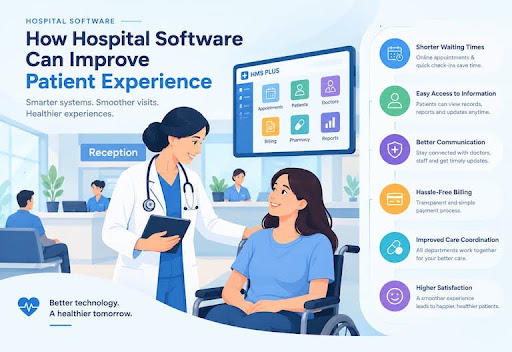
In modern healthcare, patient experience is just as vital as clinical outcomes. When patients visit a hospital or clinic, their perception is shaped not only by the physician's expertise, but by every touchpoint along their journey—from front-desk check-in and appointment scheduling to lobby wait times, laboratory testing, and final billing checkout.
When administrative processes rely on manual paperwork, paper files, or disconnected desktop software, long wait times, misplaced medical records, and confusing invoices create frustration for patients and burnout for hospital staff.
A modern Hospital Management System (HMS) transforms these pain points by uniting clinical, administrative, and financial workflows into a synchronized digital platform—delivering a seamless, efficient, and compassionate patient journey.
HMS at a Glance: Impact on Patient Experience
Check-In & Queueing
Instant UHID Lookup & Tokens
Clinical Consultation
On-Screen EHR & Instant E-Rx
Diagnostics & Pharmacy
Barcoded LIS & FEFO Inventory
Billing & Discharge
One Consolidated Invoice
| HMS PATIENT JOURNEY IMPACT | |
|---|---|
| Check-In & Queueing | Instant UHID Lookup & Tokens |
| Clinical Consultation | On-Screen EHR & Instant E-Rx |
| Diagnostics & Pharmacy | Barcoded LIS & FEFO Inventory |
| Billing & Discharge | One Consolidated Invoice |
Registration
Traditional Manual Workflow: Paper forms, manual data entry, duplicate filing
HMS-Powered Digital Workflow: Instant UHID lookup, digital intake forms
Patient Benefit: 90% faster check-in
Lobby Waiting
Traditional Manual Workflow: Unpredictable queues, crowded waiting rooms
HMS-Powered Digital Workflow: Digital queue tokens, real-time schedule sync
Patient Benefit: Reduced wait times & anxiety
Consultation
Traditional Manual Workflow: Searching for paper charts, manual prescriptions
HMS-Powered Digital Workflow: On-screen EHR access, instant e-prescriptions
Patient Benefit: Safer, focused care
Diagnostics
Traditional Manual Workflow: Physical lab slips, manual report delivery
HMS-Powered Digital Workflow: Barcoded LIS tracking, auto-linked digital reports
Patient Benefit: Rapid, error-free results
Pharmacy
Traditional Manual Workflow: Handwritten prescription reading, manual stock check
HMS-Powered Digital Workflow: Automated e-Rx routing, FEFO stock validation
Patient Benefit: Zero prescription errors
Billing
Traditional Manual Workflow: Manual fee calculation across departments
HMS-Powered Digital Workflow: Itemized, auto-aggregated digital invoicing
Patient Benefit: Fast, transparent checkout
| Patient Touchpoint | Traditional Manual Workflow | HMS-Powered Digital Workflow | Patient Benefit |
|---|---|---|---|
| Registration | Paper forms, manual data entry, duplicate filing | Instant UHID lookup, digital intake forms | 90% faster check-in |
| Lobby Waiting | Unpredictable queues, crowded waiting rooms | Digital queue tokens, real-time schedule sync | Reduced wait times & anxiety |
| Consultation | Searching for paper charts, manual prescriptions | On-screen EHR access, instant e-prescriptions | Safer, focused care |
| Diagnostics | Physical lab slips, manual report delivery | Barcoded LIS tracking, auto-linked digital reports | Rapid, error-free results |
| Pharmacy | Handwritten prescription reading, manual stock check | Automated e-Rx routing, FEFO stock validation | Zero prescription errors |
| Billing | Manual fee calculation across departments | Itemized, auto-aggregated digital invoicing | Fast, transparent checkout |
Why Is Patient Experience Important for Hospitals?
Patient experience encompasses every interaction a person has with a healthcare facility. Prioritizing patient-centered care yields measurable benefits across all areas of medical delivery:
Patient Experience Builds Trust
When patients encounter organized check-ins, prompt appointments, and transparent communication, their confidence in the facility increases. Trust directly impacts how comfortably patients share symptoms and adhere to treatment plans.
A Better Experience Can Reduce Patient Frustration
Navigating an illness or injury is inherently stressful. Eliminating operational bottlenecks—such as crowded waiting lobbies, lost files, or unexpected charges—reduces patient anxiety.
Good Communication Improves the Patient Journey
Clear communication regarding appointment schedules, diagnostic report timelines, and medical instructions keeps patients informed and engaged throughout their care.
Patient Experience Can Influence Loyalty and Recommendations
Healthcare consumers have choices. A positive operational experience encourages patients to return for future healthcare needs and recommend the facility to family, friends, and colleagues.
Patient Feedback Helps Hospitals Identify Problems
Facilities that prioritize patient experience actively track operational feedback, enabling administrators to identify delays, optimize departmental workflows, and continuously raise service standards.
What Does a Good Patient Experience Look Like?
A high-quality patient journey relies on efficiency, transparency, and care coordination:
- Fast and Simple Patient Registration: Check-in requires minimal paperwork and moves quickly without asking patients for repetitive information.
- Smooth Appointment Scheduling: Patients can book, modify, or confirm consultations without long phone delays or double-booked slots.
- Shorter and More Predictable Waiting Times: Waiting rooms remain organized through digital queue tracking and realistic doctor availability schedules.
- Clear Communication With Patients: Care teams provide clear instructions regarding care plans, medication dosages, and follow-up requirements.
- Easy Access to Tests, Reports, and Medical Information: Diagnostic lab results and radiology reports are published quickly and stored under a single patient file.
- Simple Billing and Payment Processes: Invoices are accurate, itemized, easy to understand, and generated promptly at checkout.
- Helpful Support From Hospital Staff: Administrative teams operate efficiently, providing empathetic guidance at every step.
What Causes Poor Patient Experience in Hospitals?
Negative patient experiences rarely stem from clinical errors alone; they often arise from administrative breakdowns:
Long Wait Times
Manual Queue Management
Missing Medical Files
Disconnected Paper Records
Billing Confusions
Uncoordinated Department Fees
| COMMON OPERATIONAL BOTTLENECK CAUSES | |
|---|---|
| Long Wait Times | Manual Queue Management |
| Missing Medical Files | Disconnected Paper Records |
| Billing Confusions | Uncoordinated Department Fees |
- Long Waiting Times: Overcrowded lobbies caused by manual intake systems and uncoordinated appointment slots.
- Slow or Disorganized Patient Registration: Paper registration forms that require manual data entry while queues grow.
- Appointment and Scheduling Problems: Overbooked doctors, lost booking details, or unexpected physician absences without patient notifications.
- Repeatedly Asking Patients for the Same Information: Forcing patients to re-enter demographic or medical history details across different departments.
- Poor Communication Between Departments: Information gaps between doctors, laboratories, pharmacies, and billing desks.
- Difficulty Finding Patient Information: Misplaced physical records leading to delayed consultations and repeated diagnostic tests.
- Delays in Laboratory and Pharmacy Services: Unlinked diagnostic tracking that slows sample processing and medicine fulfillment.
- Confusing Billing and Payment Processes: Inaccurate invoices, unexpected charges, and slow checkout lines.
- Lack of Follow-Up With Patients: Missing post-consultation instructions, unlinked test updates, or forgotten follow-up reminders.
What Is a Hospital Management System?
What Does a Hospital Management System Do?
A Hospital Management System (HMS) is an enterprise software platform designed to automate, streamline, and manage the full operational, administrative, clinical, and financial lifecycle of a healthcare facility.
Which Hospital Operations Can an HMS Manage?
- Front-Desk & Reception: Registration check-ins, Unique Health Identification (UHID) generation, and queue management.
- Outpatient & Inpatient Care: Consultation management, nursing charts, room allocations, and bed management.
- Diagnostics & Pharmacy: Laboratory Information Systems (LIS), sample barcoding, and First-Expiry-First-Out (FEFO) pharmacy tracking.
- Finance & Administration: Multi-department invoice generation, insurance claim processing, staff duty rosters, and executive analytics.
How Does an HMS Connect Different Hospital Departments?
An HMS creates a single centralized database. When a doctor issues an e-prescription or orders a laboratory test, that request routes automatically to the pharmacy, diagnostic lab, and billing desk instantly, eliminating duplicate data entry and manual transfers.
How Can a Hospital Management System Improve Patient Experience?
An HMS transforms the care delivery experience by replacing administrative barriers with automated digital workflows:
Fast Digital Intake
Automated UHID & Tokening
Synchronized Care
Instant Inter-Department Flow
Data-Driven Service
Bottleneck Analytics Tracking
| HMS OPERATIONAL BENEFITS | |
|---|---|
| Fast Digital Intake | Automated UHID & Tokening |
| Synchronized Care | Instant Inter-Department Flow |
| Data-Driven Service | Bottleneck Analytics Tracking |
Improve Patient Registration
With digital registration, patient demographics are recorded once and linked to a permanent UHID. Returning patients check in within seconds, removing front-desk bottlenecks.
Make Appointment Management More Organized
Digital appointment calendars sync doctor availability in real time, preventing double bookings, balancing patient loads, and keeping clinic schedules predictable.
Reduce Unnecessary Waiting and Delays
Digital queue token displays inform patients of their turn, managing lobby flow smoothly and lowering perceived wait times.
Give Staff Faster Access to Patient Information
Physicians gain immediate access to comprehensive Electronic Health Records (EHR)—including past diagnoses, drug allergy alerts, and previous lab tests—leading to faster, safer consultations.
Improve Communication Between Departments
Orders pass instantly between reception, doctors, labs, pharmacies, and accounting, ensuring all departments stay synchronized on patient progress.
Simplify Billing and Payment Management
All billable charges—consultation fees, diagnostic tests, medications, and room rates—aggregate automatically into a clear, itemized invoice, eliminating billing errors and long checkout queues.
Connect Laboratory and Pharmacy Workflows
Prescriptions route directly to the pharmacy for immediate fulfillment, while barcoded laboratory samples automate diagnostic processing and speed up report delivery.
Improve Follow-Up and Patient Records
Digital medical histories make tracking longitudinal progress simple, ensuring seamless continuity of care during follow-up visits.
Use Reports to Identify Operational Problems
Executive management dashboards track key metrics like average wait times, bed occupancy rates, and pharmacy fulfillment speeds, enabling continuous service improvements.
How Does an HMS Improve the Patient Journey?
An HMS elevates every phase of the patient's visit:
1. Reception Intake
Instant Check-In & Token
2. Physician Consultation
E-Prescription & History Access
3. Diagnostics & Medicine
Barcoded LIS & FEFO Pharmacy
4. Single-Window Checkout
Consolidated Invoicing
| END-TO-END PATIENT LIFECYCLE | |
|---|---|
| 1. Reception Intake | Instant Check-In & Token |
| 2. Physician Consultation | E-Prescription & History Access |
| 3. Diagnostics & Medicine | Barcoded LIS & FEFO Pharmacy |
| 4. Single-Window Checkout | Consolidated Invoicing |
1. Patient Registration and Reception
Upon arrival, the front desk indexes the patient's record using their UHID or phone number, generates a digital queue token, and directs them to the correct waiting zone without paper forms.
2. Appointment and Doctor Consultation
The physician views the digital queue and calls the patient. During consultation, the doctor reviews past diagnostic reports on-screen, inputs medical notes, and issues an e-prescription.
3. Laboratory and Diagnostic Services
If diagnostic work is ordered, the lab receives the request instantly. Samples are barcoded, analyzed, and the verified digital report attaches directly to the patient's central profile.
4. Pharmacy and Medication
The pharmacy receives the e-prescription, verifies stock levels through FEFO rules, prepares the order, and dispenses medications accurately without manual prescription reading.
5. Billing and Payments
At checkout, the cashier opens the consolidated invoice containing all services rendered. The patient receives an itemized bill and settles the balance quickly through their preferred payment method.
6. Follow-Up and Future Visits
When the patient returns for follow-up care, the doctor reviews all prior treatment details, test results, and prescribed medications immediately, ensuring continuous care delivery.
How Much Difference Can a Hospital Management System Make?
Reducing Manual and Repetitive Work
Automating paper-heavy workflows frees administrative and nursing teams to focus more time on direct patient care and support.
Improving Coordination Between Departments
Instant digital data sharing eliminates missing paper files, uncollected lab orders, and miscommunicated drug prescriptions across departments.
Making Patient Information Easier to Access
Care providers access complete health histories in seconds, improving diagnostic accuracy and personalizing care plans.
Helping Staff Handle Patients More Efficiently
Streamlined intake, digital queues, and instant billing enable staff to serve more patients effectively without increasing stress or administrative errors.
Giving Hospital Management Better Operational Visibility
Data-driven insights help hospital directors reallocate staff during peak hours, optimize bed utilization, and manage inventory efficiently.
Why an HMS Alone Cannot Fix Every Patient Experience Problem
While an HMS provides the operational foundation for modern healthcare, delivering exceptional patient care also requires empathetic clinical staff, clear patient communication, and strong leadership commitment.
Which Hospitals and Clinics Can Benefit From a Hospital Management System?
An HMS adapts to fit healthcare facilities of all sizes:
Private Practices
Fast Appointments & Billing
Diagnostic Centers
Barcoded LIS & Quick Reports
Enterprise Hospitals
Full OPD/IPD, Bed & Inventory
| FACILITY SCALABILITY MATRIX | |
|---|---|
| Private Practices | Fast Appointments & Billing |
| Diagnostic Centers | Barcoded LIS & Quick Reports |
| Enterprise Hospitals | Full OPD/IPD, Bed & Inventory |
- Small Clinics: Streamlines appointment booking, e-prescriptions, and basic billing for single practitioners.
- Private Clinics With Multiple Doctors: Coordinates shared reception desks, balanced scheduling, and central billing across multiple specialties.
- Diagnostic and Laboratory Centers: Automates test orders, sample tracking, analyzer connectivity, and rapid report delivery.
- Pharmacies and Healthcare Facilities: Manages inventory levels, tracks batch expiration dates, and processes fast prescription sales.
- Medium-Sized Hospitals: Integrates OPD, IPD, surgical suites, pharmacy stock, lab workflows, and financial accounting.
- Larger Hospitals With Multiple Departments: Provides enterprise-wide coordination across hundreds of beds, multi-specialty centers, and satellite facilities.
How to Choose a Hospital Management System
Selecting the right HMS requires evaluating your facility's operational priorities:
- Identify Your Hospital's Requirements: Pinpoint current operational bottlenecks—such as lobby congestion, uncollected bills, or delayed lab reports.
- Check the Modules You Actually Need: Ensure coverage for active departments (OPD, IPD, LIS, Pharmacy, Billing, HR, Inventory) without unnecessary complexity.
- Look for an Easy-to-Use Interface: Choose intuitive, clean software that requires minimal clicks and keeps staff training quick and straightforward.
- Check Role-Based Access and Permissions: Ensure granular permission controls so staff access only the data necessary for their specific duties.
- Consider Customization: Verify that prescription layouts, billing formats, and consultation forms can be customized to match your facility's branding.
- Check Reporting and Analytics: Look for built-in business intelligence dashboards that deliver clear insights into financial and operational metrics.
- Review Security and Data Protection: Confirm data encryption, routine automated backups, and adherence to medical privacy standards.
- Ask About Technical Support: Choose software vendors that provide comprehensive onboarding, staff training, and responsive technical assistance.
- Consider Scalability and Future Growth: Select cloud-native software that grows seamlessly as you add beds, departments, or new branches.
- Request a Live Demo Before Choosing: Test the software with real-world operational scenarios alongside key department leads before making a final commitment.
Why Choose HMS PLUS for Your Hospital or Clinic?
HMS PLUS is a modern, enterprise Hospital Management System engineered to streamline administrative operations, eliminate financial leakage, and deliver exceptional patient experiences across clinics, diagnostic centers, and multi-specialty hospitals.
Rapid Front-Desk Intake
UHID & Digital Queue Tokens
Integrated Departments
Synchronized LIS, Stock & HR
Granular Access Control
Secure Role-Based Data Access
| HMS PLUS ADVANTAGE | |
|---|---|
| Rapid Front-Desk Intake | UHID & Digital Queue Tokens |
| Integrated Departments | Synchronized LIS, Stock & HR |
| Granular Access Control | Secure Role-Based Data Access |
Here is why leading healthcare facilities rely on HMS PLUS:
Simplify Patient Registration and Reception
Accelerate front-desk intake with rapid patient search, automated UHID generation, duplicate record checks, and digital queue displays.
Manage Appointments and Patient Records
Equip doctors with fast consultation screens, complete patient medical records, customizable e-prescriptions, and integrated lab results.
Connect Doctors and Hospital Departments
Synchronize communication between physicians, nurses, receptionists, pharmacists, and accountants in real time.
Manage Laboratory and Pharmacy Operations
Automate lab report generation, sample barcoding, and FEFO drug inventory tracking to improve fulfillment accuracy and speed.
Simplify Accounts and Billing
Consolidate billable items from consultations, diagnostic tests, and pharmacy sales into clear, itemized invoices.
Role-Based Access for Hospital Staff
Protect patient data privacy using tailored permission tiers for receptionists, clinical staff, lab techs, pharmacists, and administrators.
Customization for Your Hospital's Requirements
Tailor clinical forms, prescription headers, invoice layouts, and operational workflows to match your practice's standards.
Technical Support
Partner with a dedicated technical team offering comprehensive onboarding, staff training, rapid issue resolution, and regular feature updates.
Frequently Asked Questions
Why Is Patient Experience Important in Hospitals?
Patient experience builds trust, reduces patient anxiety, improves care compliance, increases patient retention, and enhances a healthcare facility's reputation in the community.
What Causes Poor Patient Experience in Hospitals?
Poor patient experience is primarily caused by administrative delays, long wait times, overcrowded lobbies, lost medical records, poor communication, and confusing billing processes.
How Can Hospitals Improve Patient Experience?
Hospitals improve patient experience by streamlining front-desk registration, organizing appointment schedules, reducing wait times, clarifying billing, and uniting department workflows using modern digital tools.
Can a Hospital Management System Improve Patient Experience?
Yes. An HMS automates manual administrative processes, eliminates paper queues, speeds up diagnostic report delivery, and enables personalized patient care.
Can an HMS Reduce Patient Waiting Times?
Yes. An HMS uses digital queue token management, synchronized appointment scheduling, and real-time physician tracking to manage patient flow efficiently.
Can an HMS Improve Patient Registration?
Yes. An HMS indexes patient files under a permanent UHID, allowing returning patients to check in quickly without filling out duplicate paper forms.
How Does an HMS Improve Communication Between Hospital Departments?
An HMS connects all departments through a central database, automatically routing consultation requests, e-prescriptions, lab orders, and billing items instantly.
Should Every Hospital Use a Hospital Management System?
Yes. Facilities of all sizes—from small private practices to enterprise multi-specialty hospitals—benefit from the operational efficiency, accuracy, and improved patient care an HMS provides.
What Should Hospitals Consider Before Choosing an HMS?
Hospitals should assess departmental needs, ease of use, module coverage, data security, role-based access, technical support quality, vendor reliability, and total cost of ownership.
What Experiences Do Hospitals Have After Implementing an HMS?
Hospitals typically experience significantly reduced wait times, faster patient intake, higher billing accuracy, seamless departmental communication, and overall higher patient satisfaction.
Improve Your Hospital's Patient Experience With HMS PLUS
Delivering exceptional patient experience starts with an efficient, well-organized operational foundation. Don't let manual paperwork, long waiting lines, or administrative delays hinder your healthcare facility from providing high-quality care.
Contact the medical software team at HMS PLus today to schedule a live product demo, explore custom module configurations, and deploy an enterprise platform built to elevate your patient experience.