How to Choose a Hospital Management System in Pakistan
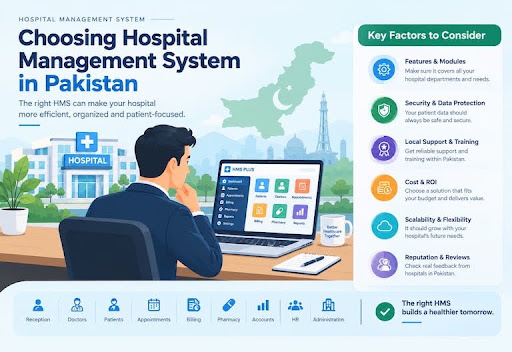
Running a hospital or medical clinic in Pakistan comes with intense daily operational pressures. Hospital administrators, medical officers, and nursing staff face long reception queues, misplaced paper files, delayed lab test reports, and billing errors. Relying on handwritten charts or disconnected desktop software often leads to operational bottlenecks that frustrate patients and exhaust staff.
A modern Hospital Management System (HMS) acts as the central digital backbone of a healthcare facility. It unifies front-desk registration, doctor consultations, laboratory diagnostics, pharmacy inventory, and accounting into one secure, streamlined workflow.
This guide walks you through everything you need to know to evaluate, test, and choose the right Hospital Management System for your facility in Pakistan.
What Is a Hospital Management System?
A Hospital Management System (HMS)—also known as a Hospital Information System (HIS)—is an integrated software suite that automates clinical, administrative, and financial workflows across a healthcare facility.
Instead of maintaining separate paper logs or independent Excel spreadsheets for each department, an HMS centralizes all patient records under a permanent Unique Health Identification (UHID) or Medical Record Number (MRN). From initial walk-in registration to doctor prescriptions, lab orders, medicine dispensing, and final discharge billing, every interaction stays linked to a single electronic chart.
Why Choosing the Right Hospital Management System Matters
Upgrading to a dedicated healthcare platform delivers immediate improvements across your entire organization:
Improve Hospital Operations
An HMS coordinates patient flow across departments. When a doctor requests a diagnostic test or prescribes medication, the order instantly routes to the laboratory or pharmacy screens, eliminating manual trip delays.
Reduce Manual Work and Errors
Handwritten prescriptions and paper billing slips frequently lead to misread drug dosages, forgotten line items, and accounting mismatches. Digital entry ensures every order is clear, legible, and tracked automatically.
Improve Patient Management
With centralized digital charts, physicians can instantly view a patient’s full medical history, past diagnoses, drug allergies, and historical lab reports during consultations.
Connect Hospital Departments
An integrated HMS connects reception, OPD, IPD, wards, operation theaters, diagnostic labs, pharmacy counters, and accounting into a synchronized network.
Support Better Reporting and Decision-Making
Real-time analytics dashboards provide leadership with instant insights into daily revenue cash flows, doctor patient counts, bed occupancy rates, and inventory consumption.
What Features Should a Hospital Management System Have?
1. Patient & Reception
UHID Lookup, Token Queueing
2. Clinical Care
Doctor E-Rx, EHR History
3. Diagnostics & Stock
Barcoded LIS, FEFO Pharmacy
4. Finance & Analytics
Itemized Bills, Admin Reports
| CORE HMS MODULE ARCHITECTURE | |
|---|---|
| 1. Patient & Reception | UHID Lookup, Token Queueing |
| 2. Clinical Care | Doctor E-Rx, EHR History |
| 3. Diagnostics & Stock | Barcoded LIS, FEFO Pharmacy |
| 4. Finance & Analytics | Itemized Bills, Admin Reports |
A complete HMS combines these essential modules:
Patient Management
Stores demography, emergency contacts, medical history, past admissions, and clinical notes under one central UHID file.
Reception and Appointment Management
Handles OPD check-ins, generates digital queue tokens, coordinates doctor availability schedules, and sends automated appointment notifications.
Doctor and Staff Management
Provides doctors with clean consultation screens for e-Prescribing while tracking staff shift schedules, attendance, and doctor commission shares.
Accounts and Billing Management
Consolidates consultation fees, procedure charges, lab tests, room tariffs, and pharmacy sales into clear, itemized invoices.
Pharmacy Management
Tracks drug inventory using First-Expiry-First-Out (FEFO) logic, issues low-stock and expiry alerts, and processes point-of-sale (POS) medicine transactions.
Laboratory Management
Prints barcoded sample collection labels, routes test requests directly to lab technicians, and produces standardized pathology and radiology reports.
Inventory Management
Monitors non-medical supplies, ward linens, surgical disposables, and office consumables to prevent sudden stockouts.
Admin Panel and User Management
Gives hospital administrators granular control over system permissions, module access, security policies, and detailed audit trails.
Reports and Analytics
Generates clean visual summaries of daily revenue, department-wise earnings, pharmacy profit margins, and operational costs.
What Should You Consider When Choosing an HMS in Pakistan?
Evaluating software requires assessing how well it adapts to your facility's daily realities:
- Does It Match Your Hospital's Requirements? Verify that the system includes the exact workflows your team uses, whether for a high-volume outpatient clinic or a multi-specialty IPD facility.
- Is It Easy for Hospital Staff to Use? Receptionists, nurses, and lab staff need intuitive interfaces that require minimal typing and quick button presses.
- Does It Support Role-Based Access? Restrict access so staff members only see screens relevant to their specific jobs, protecting confidential medical data.
- Can It Be Customized for Your Hospital? Ensure prescription layouts, invoice headers, and diagnostic report formats can be tailored with your official logos and letterheads.
- Can It Scale as Your Hospital Grows? Look for modular architecture so you can activate new wards, ICU beds, or extra diagnostic units without replacing the core platform.
- Does It Provide Reliable Technical Support? Responsive local technical support is vital when issues arise during peak clinic hours.
- How Are Data Security and Backups Managed? Confirm that the software runs automated daily local and cloud backups with strong data encryption.
- Can It Integrate With Other Systems? Check for API capabilities to connect with diagnostic laboratory machines, external accounting platforms, or payment gateways.
- Is It Accessible on Mobile and Different Devices? Mobile compatibility allows doctors and administrators to view schedules, approve orders, and monitor key metrics remotely.
What Makes Choosing an HMS in Pakistan Different?
Foreign software packages built for Western markets often struggle with local clinical and operational conditions in Pakistan:
Workflow Design
Overseas / Generic Software: Focused on appointment-only credit models
Localized Pakistan HMS Solution: Optimized for high-volume walk-in OPD and cash-dominant billing
Connectivity
Overseas / Generic Software: Requires continuous 100% cloud internet
Localized Pakistan HMS Solution: Offers local LAN networking with automatic cloud synchronization
Currency & Taxes
Overseas / Generic Software: Priced in fluctuating USD with generic tax models
Localized Pakistan HMS Solution: Fixed PKR pricing aligned with local billing practices
Technical Support
Overseas / Generic Software: Remote ticketing with time-zone delays
Localized Pakistan HMS Solution: On-site installation, local phone support, and direct assistance
| Parameter | Overseas / Generic Software | Localized Pakistan HMS Solution |
|---|---|---|
| Workflow Design | Focused on appointment-only credit models | Optimized for high-volume walk-in OPD and cash-dominant billing |
| Connectivity | Requires continuous 100% cloud internet | Offers local LAN networking with automatic cloud synchronization |
| Currency & Taxes | Priced in fluctuating USD with generic tax models | Fixed PKR pricing aligned with local billing practices |
| Technical Support | Remote ticketing with time-zone delays | On-site installation, local phone support, and direct assistance |
Local Hospital and Clinic Workflows
Pakistani clinics handle rapid walk-in patient rushes where speed at the front desk is essential.
Local Support and Implementation
Having local engineers available for hands-on staff training and rapid troubleshooting prevents operational downtime.
Customization for Local Requirements
Local tools adapt quickly to print layouts, panel billing structures, and regional doctor consultation formats.
Hosting and Data Management
A hybrid deployment model—running on a local network server with background cloud sync—keeps reception working even during internet drops.
Pricing and Total Cost
Local systems charge fixed prices in Pakistani Rupees (PKR), protecting your operational budget from foreign exchange volatility.
Understanding Local Healthcare Requirements
Systems built for Pakistan understand local insurance panels, corporate client structures, and local prescription styles.
What Should Hospitals Know About PHC Requirements When Choosing an HMS?
Understanding Applicable PHC Requirements
Healthcare regulatory bodies—such as the Punjab Healthcare Commission (PHC), Sindh Health Care Commission (SHCC), and Khyber Pakhtunkhwa Health Care Commission (KP-HCC)—enforce Minimum Service Delivery Standards (MSDS) to protect patient safety and quality of care.
Patient Documentation
Complete EHR & Vitals Log
Prescription Standards
Legible Generic/Brand E-Rx
User Accountability
Time-Stamped Audit Logs
Inspection Readiness
One-Click Regulatory Reports
| PHC COMPLIANCE HMS MATRIX | |
|---|---|
| Patient Documentation | Complete EHR & Vitals Log |
| Prescription Standards | Legible Generic/Brand E-Rx |
| User Accountability | Time-Stamped Audit Logs |
| Inspection Readiness | One-Click Regulatory Reports |
Managing Patient and Hospital Records
PHC guidelines mandate clean, organized record-keeping. An HMS links inpatient admission charts, consent forms, vitals monitoring, and discharge summaries directly to the patient's UHID file.
Documentation and Reporting
Legible prescriptions are a core MSDS standard. An HMS replaces handwritten scripts with clear, typed e-Prescriptions that record drug names, dosages, and administration instructions.
User Access and Accountability
Every interaction within an HMS is linked to individual staff credentials. The system creates time-stamped audit trails showing who entered a clinical note, modified a bill, or printed a lab report.
Why an HMS Does Not Automatically Guarantee Compliance
Installing software is an operational tool, not an automatic pass. True compliance depends on your clinical staff consistently using the system to maintain accurate patient records and adhere to standard operating procedures.
How Much Does a Hospital Management System Cost in Pakistan?
What Factors Affect HMS Pricing?
The overall investment required for an HMS depends on facility size, bed capacity, user counts, and selected functional modules.
Software and Licensing Costs
Charges for software usage, billed as a one-time purchase or a recurring monthly/annual subscription.
Hosting and Infrastructure Costs
Expenses related to local network servers, thermal printers, barcode scanners, and cloud backup storage.
Customization Costs
One-time fees for tailoring print layouts, custom clinical templates, or specialized module workflows.
Implementation, Training, and Support Costs
Fees covering on-site setup, staff training sessions, and ongoing Annual Maintenance Contracts (AMCs).
How to Evaluate an HMS Provider Before Buying
Follow this structured approach when selecting software:
- 1.Create a List of Your Hospital's Requirements: Document your daily operational pain points across all departments (reception, nursing, pharmacy, lab, accounts).
- 2.Shortlist Suitable HMS Providers: Identify local software providers with a proven track record and active hospital deployments in Pakistan.
- 3.Request a Live Demo: Include key department leads (doctors, pharmacists, lab techs, head nurses) in a full walkthrough of the software.
- 4.Test Your Actual Hospital Workflows: Ask the vendor to simulate a busy morning: register a walk-in patient, issue a queue token, enter a consultation note, generate lab orders, process pharmacy items, and produce a final bill.
- 5.Ask About Customization and Future Development: Confirm how easily prescription formats, invoice headers, and clinical templates can be adjusted to your exact preferences.
- 6.Ask About Training and Technical Support: Verify whether on-site training is included and check guaranteed response times for technical support.
- 7.Understand Data Migration and Ownership: Ensure your facility retains full ownership of all patient data and establish a clear plan for importing existing records.
- 8.Review the Complete Cost Before Making a Decision: Obtain a written breakdown of all upfront software, hardware, implementation, and ongoing maintenance charges.
Common Mistakes to Avoid When Choosing a Hospital Management System
- Choosing Based Only on Price: Extremely low-cost software often lacks adequate data security, system stability, and reliable ongoing support.
- Buying Features You Do Not Need: Avoid paying for overly complex enterprise modules that your clinic or hospital will not use day-to-day.
- Ignoring Ease of Use: Complex interfaces slow down busy medical staff, leading to incomplete record entries.
- Not Testing the Actual Workflow: Relying solely on slides or generic videos without testing real operational scenarios leads to surprises after deployment.
- Ignoring Technical Support: Software without responsive local support can lead to costly disruptions during technical issues.
- Not Asking About Future Customization: Ensure the platform can adapt as clinical requirements or regulatory formats evolve.
- Overlooking Data Security and Backup: Failing to verify local and cloud backup routines leaves patient records vulnerable to data loss.
Why Choose HMS PLUS for Your Hospital or Clinic?
HMS PLUS is designed specifically to meet the clinical, administrative, and financial needs of hospitals and medical centers in Pakistan.
Fast Local Intake
UHID, CNIC & Queue Tokens
Integrated Departments
Synchronized LIS, Stock & HR
Local Regulatory Fit
Built to Support PHC MSDS
Local On-Site Support
Hands-On Training & Upgrades
| HMS PLUS ADVANTAGE | |
|---|---|
| Fast Local Intake | UHID, CNIC & Queue Tokens |
| Integrated Departments | Synchronized LIS, Stock & HR |
| Local Regulatory Fit | Built to Support PHC MSDS |
| Local On-Site Support | Hands-On Training & Upgrades |
Manage Multiple Hospital Departments
Connects OPD, IPD, emergency rooms, wards, pharmacy counters, laboratory desks, and finance offices into one streamlined network.
Patient and Reception Management
Speeds up walk-in registrations using CNIC lookups, automated UHID creation, and sequential token queue management.
Doctor and Staff Management
Provides doctors with clear, efficient consultation screens while tracking staff shifts, attendance, and commission splits.
Accounts, Pharmacy, and Laboratory
Combines multi-head billing, FEFO drug inventory management, and barcoded diagnostic report delivery into synchronized workflows.
Role-Based Access
Protects administrative settings and patient confidentiality with secure, role-specific staff access levels.
Customization for Your Requirements
Easily adapts prescription styles, bill receipts, and diagnostic report headers to match your official hospital branding.
Technical Support
Backed by responsive local engineers providing hands-on training, smooth setup, and ongoing operational support.
Frequently Asked Questions
How Do I Choose the Right Hospital Management System in Pakistan?
Identify your facility's core operational bottlenecks, list required modules, test real clinical workflows during a live demo, verify local support options, and review all setup and maintenance costs upfront.
How Much Does a Hospital Management System Cost in Pakistan?
Pricing varies depending on facility size, bed count, user numbers, and selected modules. Total costs typically include software licensing, setup, hardware, and an ongoing maintenance contract.
What Features Should an HMS Have?
Core features include patient registration (UHID), OPD token queues, doctor e-Prescribing, FEFO pharmacy inventory, laboratory management (LIS), consolidated billing, role-based access, and analytics reports.
Is an HMS Suitable for Small Clinics?
Yes. Modular systems allow small clinics to start with essential registration, e-Prescribing, and billing features, adding advanced modules like IPD or lab management as the practice expands.
Can an HMS Be Customized for a Hospital?
Yes. Quality software enables customization of prescription templates, bill layouts, lab report headers, clinical charts, and staff access tiers.
Does an HMS Help With PHC Requirements?
Yes. An HMS organizes clinical records, produces clear e-Prescriptions, tracks patient histories, creates time-stamped user logs, and generates reports that support inspection readiness.
How Long Does It Take to Implement an HMS?
Implementation usually takes between a few days for a small clinic to 2 to 4 weeks for a multi-specialty hospital, depending on staff training schedules and data migration requirements.
What Questions Should I Ask an HMS Provider?
Ask to speak with active local clients, confirm data ownership policies, verify offline capabilities during internet drops, ask about hands-on training, and request a full breakdown of all costs.
Should I Request a Live Demo Before Choosing an HMS?
Yes. A live demo involving key department heads allows you to test real clinical and administrative scenarios on the platform before making a commitment.
Choose the Right Hospital Management System for Your Hospital
Implementing a modern, user-friendly Hospital Management System transforms how your medical facility operates day to day. Unifying your departments under one digital network eliminates reception delays, reduces administrative errors, protects financial records, and allows your team to deliver exceptional patient care.
Contact our team at HMS PLus today to schedule a live demo and discover how simple, efficient, and reliable your hospital management can be.