How to Improve Patient Registration in Hospitals
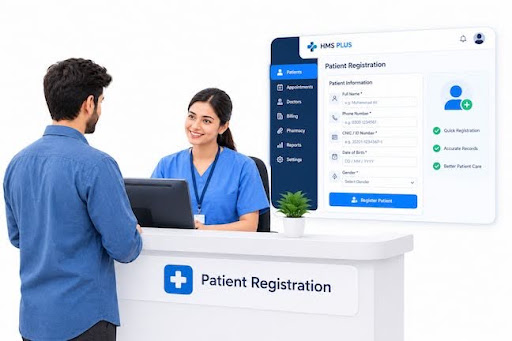
Patient registration is the front door of every healthcare facility. It is the very first step in a patient's care journey, setting the tone for their entire clinical experience. However, slow registration queues, duplicate medical files, incomplete insurance details, and manual paperwork create frustration for patients and administrative burdens for staff.
Streamlining patient registration shortens front-desk wait times, eliminates duplicate records, prevents billing errors, and ensures medical teams have accurate clinical information before consultations begin.
Here is a complete guide to understanding hospital patient registration, identifying common registration bottlenecks, and implementing practical strategies to optimize your registration process using modern digital software.
What Is Patient Registration in a Hospital?
Patient registration is the administrative process of collecting, verifying, and recording a patient’s demographic, contact, medical history, and insurance details when they arrive at a healthcare facility.
This process creates or updates the patient’s official file within the hospital's central database, forming the foundation for all downstream clinical, laboratory, pharmacy, and billing operations.
│ PATIENT REGISTRATION WORKFLOW │
- │ 1. Data Collection │ Demographics & Insurance │
- │ 2. Verification & UHID │ Identity Check & Identification│
- │ 3. Clinical Routing │ Appointment & Queue Allocation│
What Information Is Collected During Patient Registration?
During registration, reception staff gather critical administrative and clinical data, including:
- Personal Demographics Full legal name, date of birth, gender, marital status, and national identification number.
- Contact Information Phone number, email address, residential address, and emergency contact details.
- Insurance & Payment Details Primary health insurance provider, policy number, coverage terms, co-pay responsibilities, and pre-authorization approvals.
- Medical Baseline & History Known drug allergies, primary care physician details, existing chronic conditions, and current medications.
How Does the Patient Registration Process Work?
- Initial Check-in The patient arrives at reception as a new visitor or a returning patient with a scheduled appointment.
- Identity & Data Retrieval Staff search the hospital database using phone numbers, national IDs, or existing patient IDs to confirm whether a file already exists.
- Data Entry & Verification For new patients, staff create a fresh profile; for returning patients, they update contact, address, or insurance details.
- Unique Identification The system issues or confirms a Unique Health Identification (UHID) number to bind all clinical records to that specific individual.
- Queue Assignment The patient receives a digital queue token or appointment check-in confirmation and is directed to the designated waiting area or consultation room.
How Are Patient Records Used After Registration?
Once created, registration records are accessed immediately across hospital departments:
- Doctors and Nurses view baseline medical histories, drug allergies, and active consultation reasons in the Electronic Health Record (EHR) before examination.
- Laboratory & Radiology Technicians link diagnostic test orders directly to the patient's UHID for barcoded tracking.
- Pharmacists review electronic prescriptions against registered patient profiles to prevent adverse drug interactions.
- Billing & Insurance Teams use validated registration and insurance details to calculate co-pays, bill insurance claims, and process final receipts.
Why Is Efficient Patient Registration Important?
Efficient patient registration forms the structural foundation of hospital administration. Optimizing this front-desk entry point delivers key operational benefits:
- Shorter Wait Times Rapid check-ins reduce reception lobby congestion and prevent downstream delays in consultation rooms.
- Higher Data Accuracy Verifying patient details upfront eliminates mislabeled diagnostic samples, wrong prescription issuances, and dangerous medical mix-ups.
- Faster Insurance Claim Processing Collecting complete insurance details during registration reduces claim rejections, co-pay confusion, and billing disputes.
- Improved Clinical Productivity Doctors spend less time manually re-entering demographic details and more time focusing on direct patient care.
- Enhanced Patient Satisfaction Smooth, professional registration experiences reduce patient anxiety and build trust in your hospital’s quality of care.
Common Patient Registration Problems Hospitals Face
Many healthcare facilities struggle with registration bottlenecks caused by manual systems, inadequate software, or unstandardized staff workflows.
Disorganized or Duplicate Patient Records
When reception staff fail to find an existing record—or re-key name variations like "Rob Smith" versus "Robert Smith"—the system creates duplicate patient files. This fragments a patient's medical history across multiple profiles, hiding critical allergies or treatment records from consulting doctors.
Incorrect or Conflicting Patient Appointments
Manual scheduling leads to double-booked time slots, unassigned consultation rooms, or missing patient check-ins. When registration systems fail to communicate directly with doctor schedules in real time, patient waiting times escalate rapidly.
Repeated Data Entry
Asking returning patients to fill out physical paper forms on every visit causes staff fatigue and patient frustration. Re-keying identical data from paper forms into disconnected software applications doubles administrative effort and introduces typing errors.
Long Waiting Times at Reception
Peak morning hours often bottleneck reception desks. Manual record searching, physical paperwork filling, and manual insurance verification slow down patient intake, creating crowded waiting rooms and delayed doctor schedules.
Incomplete Patient Information
In high-pressure situations, staff may skip mandatory fields—such as emergency contacts, drug allergy histories, or full insurance details. Incomplete records lead to delayed treatment approvals, billing errors, and uncollected payments.
Difficulty Managing Insurance and Payments
Verifying policy coverage, co-pay percentages, and pre-authorization requirements manually at the front desk causes long payment delays. Unverified insurance details result in denied claims and unrecoverable hospital revenue.
How Can Hospitals Improve Patient Registration?
Overcoming registration challenges requires a strategic blend of clear operational standards, staff training, and modern digital software tools.
Standardize the Registration Process
Create a unified intake protocol that every receptionist follows. Define required data fields, standard naming formats, address conventions, and mandatory identity verification steps across all intake desks and departments.
Use Digital Patient Registration Forms
Replace clipboards and paper forms with self-service registration kiosks, mobile check-in apps, or digital tablets at reception. Patients can fill out demographics, sign digital consent waivers, and upload ID cards before meeting front-desk staff.
Verify Patient Information Before Saving Records
Incorporate real-time system prompts that validate phone numbers, email formats, and national ID lengths before saving a profile. Implementing mandatory fields ensures staff cannot bypass essential clinical or payment information.
Avoid Creating Duplicate Patient Records
Enforce automated duplicate detection rules within your registration software. The system should automatically alert receptionists if an incoming patient matches an existing name, phone number, or date of birth, prompting them to merge profiles rather than create a duplicate UHID.
Connect Registration With Appointment Scheduling
Integrate registration desks directly with real-time doctor availability calendars. When a patient registers, the system should automatically update consultation queue tokens, notify assigned nurses, and reflect real-time lobby status on doctor dashboards.
Train Reception Staff
Invest in continuous customer service and system training for front-desk teams. Staff should understand proper data entry protocols, communication techniques for managing crowded waiting rooms, and basic software troubleshooting.
Review Registration Reports Regularly
Analyze front-desk metrics weekly to identify bottlenecks. Track average registration handling times, peak arrival hours, intake error rates, and staff throughput to adjust shift rosters and improve workflow balance.
Why Use a Hospital Management System for Patient Registration?
Relying on physical paper logs or standalone spreadsheets causes operational friction. A specialized Hospital Management System (HMS) transforms patient registration into a fast, error-free digital process.
An integrated HMS automates identity checking, generates unique UHID tags instantly, links registration data to electronic medical records, and shares patient details seamlessly across clinical, laboratory, pharmacy, and billing departments in real time.
How to Choose the Right Hospital Management System for Patient Registration
When selecting an HMS to manage patient intake, evaluate options against these critical functional standards:
- Check Patient Registration Features Ensure the platform supports swift search indexing, automated UHID generation, family profile grouping, and instant profile merging for duplicate resolution.
- Review Appointment Management Look for unified scheduling tools that automatically check in registered patients, sync with doctor consultation calendars, and manage digital queue tokens.
- Check Forms, Consent, and Insurance Support Verify that the system accommodates custom digital forms, electronic signature capture for consent waivers, and pre-built fields for complex insurance policies.
- Consider Ease of Use The front-desk interface must be clean, uncluttered, and intuitive so receptionists can register patients with minimal keystrokes during peak hours.
- Review Security and User Permissions Ensure the platform offers strict role-based access controls, complete data encryption, and audit logging to protect sensitive personal health information (PHI).
- Check Reporting and Integration Confirm the system includes built-in analytics dashboards to monitor intake volume, wait times, and registration error rates while offering smooth API connectivity to external labs or insurance portals.
- Consider Scalability and Support Choose cloud-ready software that scales easily across added bed capacities or new satellite clinic branches, backed by responsive 24/7 technical assistance.
Why Choose HMS PLUS for Patient Registration?
HMS PLUS is an enterprise-ready hospital management system engineered to streamline front-desk check-ins, eliminate duplicate patient files, and accelerate patient flow across healthcare facilities.
Here is why hospital administrators choose HMS PLUS for patient registration:
- Instant UHID & Duplicate Prevention HMS PLUS features intelligent search algorithms that detect matching records instantly, ensuring every patient receives a single, unified health record across all visits.
- Rapid Front-Desk Check-In Designed with a human-centered UI, HMS PLUS allows reception staff to register new patients and issue consultation tokens in under a minute.
- Seamless EHR & Departmental Sync Patient details entered at reception instantly populate doctor dashboards, laboratory order forms, pharmacy portals, and billing systems without duplicate typing.
- Integrated Insurance & Billing Workflows Capture policy details, pre-authorizations, and co-pay parameters upfront to eliminate billing friction and streamline insurance claim processing.
- Real-Time Queue & Intake Analytics Monitor front-desk check-in speeds, lobby wait times, and registrar productivity from comprehensive real-time executive dashboards.
Frequently Asked Questions
What Information Is Collected During Hospital Patient Registration?
Hospital patient registration gathers personal demographics (full name, date of birth, national ID), contact information (phone number, address, emergency contacts), health insurance policy details, and baseline medical information (allergies, primary conditions, existing prescriptions).
How Can Hospitals Reduce Patient Registration Waiting Times?
Hospitals reduce registration wait times by adopting self-service check-in tablets, pre-registering patients online before their visit, standardizing front-desk intake protocols, using fast digital search indexing, and deploying automated Hospital Management Systems like HMS PLUS.
How Can a Hospital Avoid Duplicate Patient Records?
Hospitals prevent duplicate files by assigning a permanent Unique Health Identification (UHID) to every patient, enforcing automated software alerts that flag matching phone numbers or national IDs, and training reception staff to search thoroughly before creating new entries.
How Does Patient Registration Connect With Appointment Scheduling?
When patient registration connects directly with appointment scheduling, checking in at reception automatically updates doctor availability calendars, issues digital queue tokens, and alerts clinical staff in consultation rooms in real time.
Can a Hospital Management System Improve Patient Registration?
Yes. An HMS replaces slow paper logs with rapid digital workflows, automates duplicate checking, connects front-desk registration to electronic medical records (EHR), captures digital signatures, and simplifies insurance verification.
What Should Hospitals Look for in Patient Registration Software?
Hospitals should prioritize rapid search capabilities, automated duplicate detection, real-time appointment sync, custom digital consent forms, strong security permissions, intuitive interface design, and built-in intake performance analytics.
Get Started With HMS PLUS
Don't let slow reception queues, duplicate records, or administrative friction compromise your hospital's patient experience.
Contact the medical software team at HMS PLus today to schedule a live product demo, explore custom registration workflows, and implement a modern hospital management platform engineered to optimize your front-desk operations.