Top Features Every Hospital Management System Should Have
Modern healthcare facilities handle hundreds of patient visits, diagnostic requests, medication prescriptions, and financial transactions every day. Managing these complex workflows with paper records or disconnected software causes long waiting times, administrative errors, billing mistakes, and delayed patient care.
A modern Hospital Management System (HMS) connects every department—from reception and outpatient clinics to laboratories, pharmacies, and billing offices—into a single digital platform. By digitizing daily workflows, healthcare providers reduce operational costs, eliminate duplicate data entry, and deliver faster, safer patient care.
Here is a complete guide to the essential features every hospital management system must have, how to evaluate HMS software, and why HMS PLUS is the ideal solution for modern healthcare facilities.
Top Features Every Hospital Management System Should Have
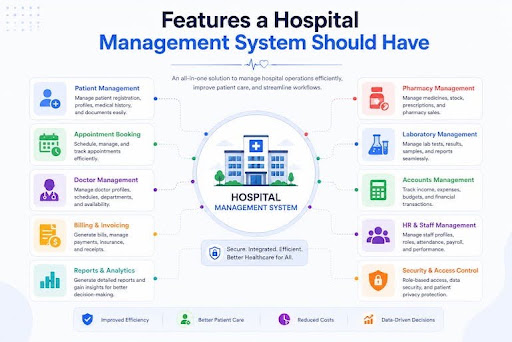
A complete Hospital Management System should provide integrated modules that connect front-desk operations, clinical care, diagnostics, pharmacy, staff management, accounts, and inventory.
Reception Management
The reception desk is the first point of contact for every patient. A dedicated reception management module simplifies outpatient department (OPD) check-ins, tracks doctor availability in real time, manages digital queue tokens, and coordinates inpatient admissions (IPD). Digitizing registration reduces front-desk waiting times, eliminates physical paperwork, and creates a fast, organized onboarding experience for visitors.
Doctor Management
The doctor management module gives medical staff intuitive digital tools to organize daily schedules, review patient queues, and conduct consultations efficiently. Physicians can instantly access complete Electronic Health Records (EHR), review past diagnoses, check test results, and reference drug allergy histories. Doctors can also issue accurate digital prescriptions (e-prescriptions) in seconds, reducing errors caused by handwritten notes.
Patient Management
Patient management serves as the central database for patient demographic information, unique health identification (UHID) numbers, complete medical histories, and treatment records. Storing patient information in one secure system ensures seamless continuity of care across all hospital departments. It also protects historical medical records against physical loss, theft, or unauthorized access.
Pharmacy Management
The pharmacy management module tracks prescription medication stock in real time and automates the drug dispensing process. It receives digital prescriptions directly from doctor consultation dashboards, processes orders immediately, and monitors batch expiration dates using First-Expiry-First-Out (FEFO) inventory rules. Automatic low-stock alerts prevent unexpected medicine shortages while generating clear, accurate customer billing receipts.
Staff Management
Smooth clinical operations rely on well-organized healthcare teams. The staff management module manages human resources functions across doctors, nurses, administrative staff, and lab technicians. It automates duty rosters, tracks attendance and leave requests, calculates payroll allowances, and manages secure role-based access permissions so staff members only see the data required for their specific jobs.
Accounts Management
The accounts management module acts as the financial hub of the hospital. It automatically collects billable charges from OPD consultations, IPD room stays, laboratory tests, surgical procedures, and pharmacy orders into one itemized invoice. It also simplifies insurance claim processing, co-pay calculations, tax reporting, and department revenue tracking, eliminating financial leakage and manual accounting errors.
Laboratory Management
A Laboratory Information System (LIS) coordinates diagnostic testing workflows from initial sample collection to final report publishing. Lab technicians can scan barcoded test samples, interface directly with diagnostic machines to import test results automatically, and publish verified digital lab reports straight to the patient’s health record and patient portal.
Inventory Management
The inventory management module monitors non-medical supplies, surgical instruments, reusable medical devices, and hospital machinery. It provides complete stock visibility across individual departments, triggers automatic purchase orders when stock levels fall below safety thresholds, and tracks vendor invoices to keep operating costs predictable.
How to Choose the Right Hospital Management System
Selecting the best hospital management software requires evaluating platforms against key operational standards:
- Required Modules: Verify that the software includes all the functional modules your facility needs today—such as OPD, IPD, LIS, Pharmacy, and Accounts—along with the flexibility to activate additional specialized modules as your hospital grows.
- Ease of Use: Healthcare professionals work in high-pressure environments. The software interface must be clean, responsive, and easy to navigate so doctors, nurses, and desk staff can perform routine tasks with minimal training and fewer clicks.
- Scalability: Choose cloud-native or modern web architecture capable of handling growing patient volumes, higher transaction numbers, and new facility branches without slowing down system performance.
- Security & Data Privacy: Medical software must protect confidential patient records through strong data encryption, automated system backups, strict role-based access controls, and compliance with national healthcare privacy standards.
- Analytics & Reporting: A quality HMS includes real-time analytics dashboards that offer clear visibility into bed occupancy rates, daily cash collections, pharmacy inventory turnover, and overall department profitability.
- Support & Maintenance: Work with reliable software vendors that offer 24/7 technical support, fast response times, comprehensive staff training, and continuous software updates to prevent system downtime.
- Transparent Pricing: Review subscription plans, implementation fees, and ongoing maintenance costs upfront to avoid unexpected charges for extra user accounts, storage expansions, or system updates.
Why Choose HMS PLUS?
HMS PLUS is an enterprise-ready hospital management system engineered to simplify clinical workflows, prevent revenue leakage, and improve patient care across outpatient clinics, diagnostic centers, and multi-specialty hospitals.
Here is why healthcare organizations choose HMS PLUS as their digital platform:
- All-in-One Integration: HMS PLUS seamlessly connects every department—reception, doctors, pharmacy, laboratory, accounting, and inventory—into one unified system, eliminating duplicate data entry.
- Simple, User-Friendly Interface: Built with a clean, human-centered layout, HMS PLUS reduces training time for medical personnel and speeds up patient check-ins, consultations, and billing processing.
- Enterprise-Grade Security: HMS PLUS protects sensitive health records with end-to-end data encryption, automated audit logs, and customizable role permissions to maintain complete data privacy.
- Real-Time Financial Dashboards: Healthcare administrators get instant access to operational insights, real-time collection totals, stock movements, and financial performance reports from any device.
- Flexible Cloud Deployment: HMS PLUS scales effortlessly alongside your healthcare practice, whether you operate a single specialty clinic or manage a multi-branch hospital network.
Frequently Asked Questions
How Does Buying a Hospital Management System Save Money and Time?
An HMS automates routine administrative tasks like filing paper records, tracking appointments, and calculating medical bills. By replacing manual paperwork with digital processes, hospitals save money on stationery, stop missed billing charges, track inventory efficiently to avoid drug expiration, and allow staff to treat more patients in less time.
Should Clinics and Hospitals Use a Hospital Management System?
Yes. Both small outpatient clinics and large multi-bed hospitals benefit significantly from an HMS. Small clinics use primary modules like appointment scheduling, digital medical records, and billing to keep daily operations organized, while large hospitals use the full suite of integrated modules to manage complex, multi-department operations smoothly.
What Are the Most Important Features of a Hospital Management System?
The core features every facility needs include Patient Registration (UHID), Doctor Consultations with EMR, Pharmacy Management, Laboratory Information System (LIS), Accounts & Billing, and Inventory Control. Together, these essential features cover every step of the patient care lifecycle from check-in to treatment and discharge.
Why Do Hospital Management Systems Have Different Modules Instead of One Module?
Hospitals consist of specialized departments with completely different daily tasks. A pharmacist needs batch tracking and stock alerts, a doctor needs medical history and prescription tools, and an accountant requires invoice consolidation and financial reports. Dedicated modules cater directly to the specific needs of each department while sharing core data centrally across the whole organization.
Get Started With HMS PLUS
Don't let manual paperwork, administrative delays, or software friction hold your medical facility back from delivering exceptional care.
Contact the[HMS PLus] today to schedule a live product demo, explore custom system configurations, and implement a modern hospital management platform built to streamline your operations and grow your healthcare business.