HMS vs EHR vs EMR: What Is the Real Difference?
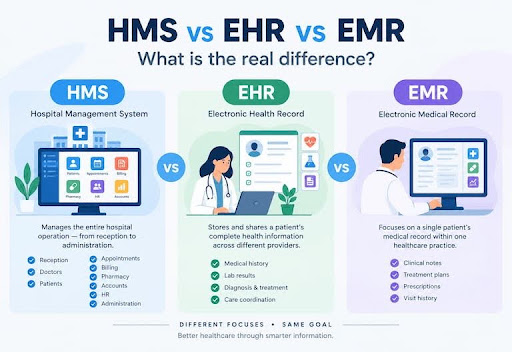
In healthcare technology, terms like HMS, EHR, and EMR are frequently used interchangeably. However, confusing these software applications can lead healthcare providers to invest in platforms that do not fit their operational needs.
While an EMR digitized clinical charts within a single practice, an EHR focuses on sharing health histories across multiple healthcare facilities, and an HMS manages the complete administrative, operational, and financial framework of a hospital.
This guide clarifies the differences between an HMS, EHR, and EMR, explains how they work together, and helps you select the best platform for your hospital or clinic.
HMS vs EHR vs EMR: Quick Comparison
EMR (Digital Chart)
Internal Clinical Records
EHR (Interoperable Record)
Cross-Provider Health Files
HMS (Hospital Enterprise)
All Departments & Billing
| HEALTHCARE SYSTEM SCOPE COMPARISON | |
|---|---|
| EMR (Digital Chart) | Internal Clinical Records |
| EHR (Interoperable Record) | Cross-Provider Health Files |
| HMS (Hospital Enterprise) | All Departments & Billing |
Primary Scope
EMR (Electronic Medical Record): Internal practice medical charting
EHR (Electronic Health Record): Interoperable multi-facility patient history
HMS (Hospital Management System): Facility-wide clinical, administrative & financial operations
Main Users
EMR (Electronic Medical Record): Individual doctors, nurses, local clinic staff
EHR (Electronic Health Record): Multi-specialty care teams, external clinics, health networks
HMS (Hospital Management System): Receptionists, doctors, lab techs, pharmacists, accountants, HR, admins
Data Mobility
EMR (Electronic Medical Record): Stays within a single medical practice
EHR (Electronic Health Record): Shared securely across external health organizations
HMS (Hospital Management System): Shared internally across all internal hospital departments
Financial Tools
EMR (Electronic Medical Record): Basic consultation fee entry
EHR (Electronic Health Record): Integrated insurance and billing billing codes
HMS (Hospital Management System): Comprehensive accounts, department billing, LIS, pharmacy & inventory
Best Suited For
EMR (Electronic Medical Record): Independent private clinics and single practices
EHR (Electronic Health Record): Multi-branch clinics, health systems, regional networks
HMS (Hospital Management System): Specialty clinics, multi-bed hospitals, diagnostic centers
| Feature / Standard | EMR (Electronic Medical Record) | EHR (Electronic Health Record) | HMS (Hospital Management System) |
|---|---|---|---|
| Primary Scope | Internal practice medical charting | Interoperable multi-facility patient history | Facility-wide clinical, administrative & financial operations |
| Main Users | Individual doctors, nurses, local clinic staff | Multi-specialty care teams, external clinics, health networks | Receptionists, doctors, lab techs, pharmacists, accountants, HR, admins |
| Data Mobility | Stays within a single medical practice | Shared securely across external health organizations | Shared internally across all internal hospital departments |
| Financial Tools | Basic consultation fee entry | Integrated insurance and billing billing codes | Comprehensive accounts, department billing, LIS, pharmacy & inventory |
| Best Suited For | Independent private clinics and single practices | Multi-branch clinics, health systems, regional networks | Specialty clinics, multi-bed hospitals, diagnostic centers |
What Is an EMR?
What Is an Electronic Medical Record?
An Electronic Medical Record (EMR) is a digital version of a patient's paper chart within a single medical practice. It contains a patient's clinical and medical history recorded during visits to a specific clinic or physician office.
What Is the Main Purpose of an EMR?
The main purpose of an EMR is to replace paper medical files with accurate digital records. It allows care providers to track health data over time, monitor routine check-ups, and review diagnostic findings within their local practice.
What Information Does an EMR Manage?
- Patient medical history, progress notes, and diagnostic clinical observations.
- Recorded vital signs, growth charts, and BMI tracking.
- Local laboratory test results and imaging reports.
- E-prescriptions issued during consultation sessions.
- Immunization records and drug allergy notes.
Why Do Clinics Use EMRs?
Clinics adopt EMRs to eliminate paper chart clutter, improve diagnostic accuracy, reduce typing errors, speed up routine consultations, and safeguard patient files against physical loss or damage.
When Should You Choose an EMR?
Choose an EMR if you run an independent medical practice or single-specialty clinic that needs a digital medical recording tool to manage patient consultations without complex inter-departmental billing, laboratory, or pharmacy workflows.
What Is an EHR?
What Is an Electronic Health Record?
An Electronic Health Record (EHR) is an interoperable digital record of a patient’s total health history, designed to be shared securely across different healthcare providers, laboratories, and health organizations.
What Is the Main Purpose of an EHR?
The primary goal of an EHR is to provide a complete, portable view of a patient’s health journey across time and across different facilities. It ensures that any authorized physician treating the patient has immediate access to past medical history.
How Is an EHR Different From an EMR?
While an EMR keeps a patient's history locked within a single practice, an EHR moves with the patient. An EHR supports standardized data formats (such as HL7 and FHIR) that allow external clinics, hospitals, diagnostic laboratories, and specialists to access shared records securely.
EMR Data Flow
Clinic A Internal Database
EHR Data Flow
Clinic A ↔ Hospital B ↔ Labs
| EMR vs EHR PORTABILITY | |
|---|---|
| EMR Data Flow | Clinic A Internal Database |
| EHR Data Flow | Clinic A ↔ Hospital B ↔ Labs |
Why Do Healthcare Organizations Use EHRs?
Healthcare systems utilize EHRs to support collaborative care, eliminate duplicate diagnostic testing, improve emergency response with instant access to allergy records, and comply with national health data-sharing mandates.
When Should You Choose an EHR?
Select an EHR if you manage a multi-specialty group practice, health network, or facility that routinely coordinates with external diagnostic centers, referral doctors, and health insurance providers requiring shared electronic records.
What Is a Hospital Management System?
What Is an HMS?
A Hospital Management System (HMS) is an enterprise-wide healthcare software platform designed to automate, connect, and manage the complete operational, administrative, clinical, and financial workflows of a medical facility.
What Is the Main Purpose of an HMS?
The main purpose of an HMS is to unify all hospital departments—reception, outpatient clinics, inpatient wards, laboratories, pharmacies, accounting, human resources, and central inventory—into a single synchronized operational framework.
What Does an HMS Manage?
- Patient & Reception: Registration check-ins, Unique Health Identification (UHID) generation, digital queue tokens, and IPD bed allocation.
- Clinical Care: Doctor consultations, electronic prescriptions, and diagnostic test ordering.
- Diagnostics & Pharmacy: Laboratory Information Systems (LIS), sample barcoding, and First-Expiry-First-Out (FEFO) pharmacy inventory tracking.
- Finance & Administration: Automated invoice aggregation, insurance claim processing, staff rosters, payroll, and departmental profitability analytics.
When Should You Choose an HMS?
Choose an HMS if you operate a multi-department clinic, surgical center, or hospital that needs to manage front-desk queues, multi-department billing, inventory stock, staff rosters, and laboratory workflows alongside patient care.
Why Do Hospitals Need More Than a Medical Record System?
Medical record tools (EMRs and EHRs) handle clinical notes and diagnostic records, but they do not manage front-desk registration queues, bed occupancy rates, pharmacy stock levels, lab machinery interfaces, or complex financial billing. A hospital requires an HMS to manage these non-clinical daily operations.
HMS vs EHR vs EMR: What Is the Difference?
EMR vs EHR
- Scope: EMRs manage internal clinical charts within one practice; EHRs manage a broader health record shared across multiple health organizations.
- Interoperability: EMRs are generally non-interoperable; EHRs use standard protocols (HL7/FHIR) to exchange data across external networks.
HMS vs EMR
- Operational Scope: EMRs focus on physician consultation notes and clinical history; an HMS manages overall hospital operations, including patient check-ins, pharmacy inventory, lab workflows, and accounting.
- User Base: EMRs are used primarily by doctors and nurses; an HMS is used by every department, including receptionists, pharmacists, accountants, lab techs, and HR personnel.
HMS vs EHR
- Focus: EHRs focus on patient clinical portability across different health facilities; an HMS focuses on internal hospital administration, department workflows, financial tracking, and operational control.
- Functionality: An EHR serves as a health file repository; an HMS serves as the operating platform for the entire facility.
Key Differences in Purpose, Users, and Features
Primary Goal
EMR: Digital physician charting
EHR: Shared patient health history
HMS: Facility operational management
Target Users
EMR: Doctors & Nursing staff
EHR: Care teams & Health networks
HMS: Entire hospital & clinic staff
Billing Depth
EMR: Basic consultation fees
EHR: Insurance code logging
HMS: Centralized multi-department billing
Department Control
EMR: Minimal
EHR: Low
HMS: High (LIS, Pharmacy, HR, Stores)
| Dimension | EMR | EHR | HMS |
|---|---|---|---|
| Primary Goal | Digital physician charting | Shared patient health history | Facility operational management |
| Target Users | Doctors & Nursing staff | Care teams & Health networks | Entire hospital & clinic staff |
| Billing Depth | Basic consultation fees | Insurance code logging | Centralized multi-department billing |
| Department Control | Minimal | Low | High (LIS, Pharmacy, HR, Stores) |
How Do HMS, EHR, and EMR Work Together?
In a modern healthcare facility, these systems interact across the patient care journey:
1. Reception (HMS)
Registration & Token Issue
2. Consultation (EMR/EHR)
Examination & E-Prescription
3. Diagnostics (LIS/HMS)
Sample Barcode & Lab Results
4. Pharmacy & Billing (HMS)
FEFO Dispensing & Invoicing
| INTEGRATED PATIENT CARE FLOW | |
|---|---|
| 1. Reception (HMS) | Registration & Token Issue |
| 2. Consultation (EMR/EHR) | Examination & E-Prescription |
| 3. Diagnostics (LIS/HMS) | Sample Barcode & Lab Results |
| 4. Pharmacy & Billing (HMS) | FEFO Dispensing & Invoicing |
Patient Registration and Appointments
A patient checks in at the front desk. The HMS registers their details, assigns a permanent UHID, checks insurance coverage, and places them into a digital queue.
Doctor Consultation and Patient Records
The doctor opens the patient file. The embedded EMR/EHR module displays medical history, past diagnoses, and allergy alerts. The doctor records consultation notes and issues an e-prescription.
Laboratory and Pharmacy Management
The e-prescription and test requests flow automatically from the doctor's screen to internal hospital departments managed by the HMS. Lab technicians scan barcoded samples, while pharmacists receive orders routed through FEFO inventory controls.
Billing, Accounts, and Payments
As care is delivered, the HMS automatically compiles consultation fees, diagnostic costs, and pharmacy charges into a single itemized invoice, preventing unbilled services and revenue loss.
Reports and Hospital Administration
Hospital administrators use the HMS dashboard to review operational performance metrics—such as daily cash collections, bed occupancy rates, pharmacy stock turnover, and staff attendance.
How to Choose Between HMS, EHR, and EMR
Choose an EMR When...
- You manage a small, single-specialty private clinic.
- Your primary goal is to replace paper medical charts with digital records.
- You do not require multi-department billing, inventory tracking, or lab integrations.
Choose an EHR When...
- You operate a multi-branch clinic network or specialty practice.
- Your patients routinely visit external specialists, diagnostic centers, or referral hospitals.
- You must comply with regional or national health data exchange standards.
Choose an HMS When...
- You manage a hospital, multi-department clinic, or diagnostic center with inpatient and outpatient care.
- You need to coordinate reception queues, pharmacy inventory, lab testing, staff rosters, and financial accounting.
- You want to eliminate revenue loss through centralized multi-department billing.
Consider an Integrated Approach When...
- You require a single platform that handles enterprise administrative tasks alongside clinical recordkeeping. Modern solutions like HMS PLUS combine core HMS operational tools with built-in EMR/EHR consultation interfaces.
What Should You Consider Before Choosing a Healthcare Management System?
Selecting healthcare software requires evaluating your facility's operational priorities:
- Assess Requirements: Identify bottlenecks in your facility, such as long reception lines, misplaced files, or uncollected pharmacy charges.
- Check Modules: Ensure the software provides necessary modules—such as OPD, IPD, LIS, Pharmacy, Accounts, and HR—to avoid relying on disconnected third-party software.
- Check Integrations: Verify that the software interfaces with laboratory analyzers, payment processing systems, SMS gateways, and external medical devices.
- Consider Scalability & Customization: Select cloud-native software that scales to support added bed capacity or new satellite clinics while supporting custom form layouts.
- Review Security & Role Access: Ensure the system uses end-to-end data encryption, automated system backups, and strict role-based permission settings to safeguard patient health information.
- Evaluate Technical Support: Partner with software providers that offer 24/7 technical support, fast emergency response times, and comprehensive staff onboarding.
- Request a Live Demo: Conduct a live workflow demo with your key team to evaluate system speed and interface navigation using your facility's daily operational scenarios.
Why Choose HMS PLUS for Your Hospital or Clinic?
HMS PLUS is a modern hospital management platform that combines complete enterprise HMS administration with built-in EMR and EHR functionality into one unified system.
Complete HMS Controls
Reception, LIS, Stock & HR
Built-In EMR / EHR
Fast Consultation & History
Granular Role Security
Role-Based Data Protection
| HMS PLUS ADVANTAGE | |
|---|---|
| Complete HMS Controls | Reception, LIS, Stock & HR |
| Built-In EMR / EHR | Fast Consultation & History |
| Granular Role Security | Role-Based Data Protection |
Manage Multiple Hospital Departments
HMS PLUS connects reception, outpatient clinics, inpatient wards, pharmacy inventory, diagnostic laboratories, human resources, and financial accounting into one database, eliminating duplicate data entry.
Patient and Reception Management
Accelerate front-desk check-ins with fast search indexing, automatic Unique Health Identification (UHID) generation, intelligent duplicate prevention, and digital queue tokens.
Doctor and Staff Management
Provide physicians with custom consultation screens, complete patient health records, e-prescribing tools, and integrated lab result views to streamline consultations.
Accounts, Pharmacy, and Laboratory
Automate billing across clinical consultations, lab tests, and pharmacy sales. HMS PLUS provides FEFO inventory rules, automated lab report publishing, and insurance claims processing.
Role-Based Access
Protect sensitive health records with granular permission controls. Receptionists, doctors, nurses, lab technicians, pharmacists, and accountants access interfaces tailored to their specific daily duties.
Customization
Tailor e-prescription layouts, invoice formats, consultation forms, and department workflows to match your practice's established protocols and branding.
Technical Support
Partner with a dedicated technical team offering comprehensive onboarding, staff training, fast technical assistance, and continuous platform updates.
Frequently Asked Questions
What Is the Main Difference Between EMR and EHR?
The main difference is portability and scope. An EMR is a digital chart used internally within a single medical practice, while an EHR contains a broader medical history designed to be shared securely across external health organizations.
What Is the Difference Between HMS and EHR?
An EHR focuses on managing and sharing patient clinical health records across providers. An HMS manages the complete operational, administrative, and financial functions of a hospital, including billing, inventory, reception queues, and laboratory testing.
What Is the Difference Between EMR and HMS?
An EMR is focused on physician charting and clinical patient notes within a single practice. An HMS is an enterprise platform managing all internal hospital operations across every department.
Can an HMS Include EHR or EMR Features?
Yes. Modern, enterprise Hospital Management Systems like HMS PLUS feature fully integrated EMR and EHR modules, allowing doctors to record clinical notes and review health histories within the broader operational software.
Should a Clinic Choose an EMR, EHR, or HMS?
A small, single-doctor clinic focusing only on patient notes can start with an EMR. However, if the clinic manages a pharmacy, conducts lab tests, or employs multiple doctors and receptionists, an integrated HMS is the recommended choice.
Does a Hospital Need Both an HMS and an EHR?
Hospitals require the operational capabilities of an HMS alongside the clinical recordkeeping of an EHR/EMR. Choosing an integrated platform like HMS PLUS provides both functions in a single database, eliminating the need for separate software applications.
Can HMS, EHR, and EMR Systems Work Together?
Yes. Through standardized health messaging protocols (such as HL7 and FHIR) and secure APIs, these systems can share data so clinical notes entered in an EMR/EHR sync directly with the administrative and billing workflows of an HMS.
Find the Right System for Your Hospital or Clinic
Selecting the right software begins with a clear assessment of your facility's daily operational needs. If you only need to digitize physician charts, an EMR is sufficient. If you need to share clinical records across health networks, an EHR is necessary. However, if you need to run a modern, efficient, and profitable healthcare facility, an integrated Hospital Management System is required.
Contact the medical software team at HMS PLUS today to schedule a live product demo, evaluate custom system configurations, and deploy a modern platform built to streamline your operations and grow your practice.